
Selective Call Appearance
Article ID: 341 | Rating: Unrated | Last Updated: Mon, Feb 15, 2021 at 3:18 PM
Selective Call Appearance
Description
Accept calls when pre-defined criteria, such as phone number, time of day or day of week, are met.
Function
Selective Call Acceptance allows you to receive only calls that meet your pre-defined criteria. The criteria for each Selective Acceptance entry can be a list of up to 12 phone numbers or digit patterns, a specified time schedule, and a specified holiday schedule. All criteria for an entry must be true for you to receive the call.
Configuration/Operation
In The Business Port navigate to:
- Employees > Features > Call Control > Selective Call Acceptance
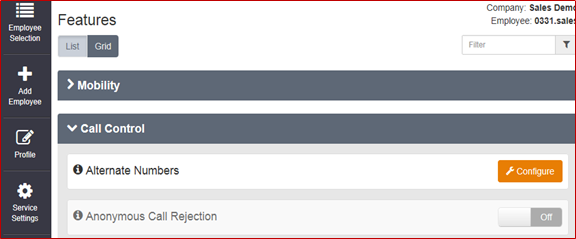
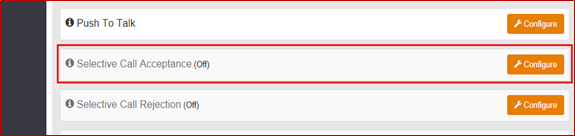
- Select ‘Configure’
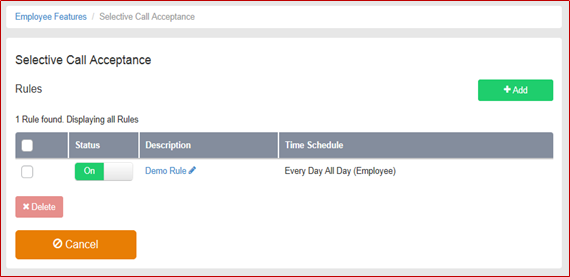
- To Add a New Rule Click ‘Add’
- To edit an existing Rule select the Rule under the ‘Description’ Heading.
- To Delete a rule select the right hand tick box and click ‘Delete’
- To Delete all rules select the right hand tick box in the header bar and click ‘Delete’
- Click ‘Add’
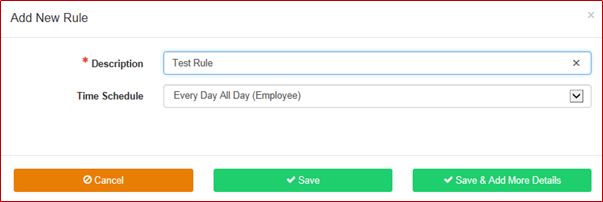
- Add a description of the rule.
- Select a Time schedule from the dropdown menu.
- Note:- Time schedules need to be pre-configured (Please refer to the Site Features Guide for more details)
- Click ‘Save & Add More Details’
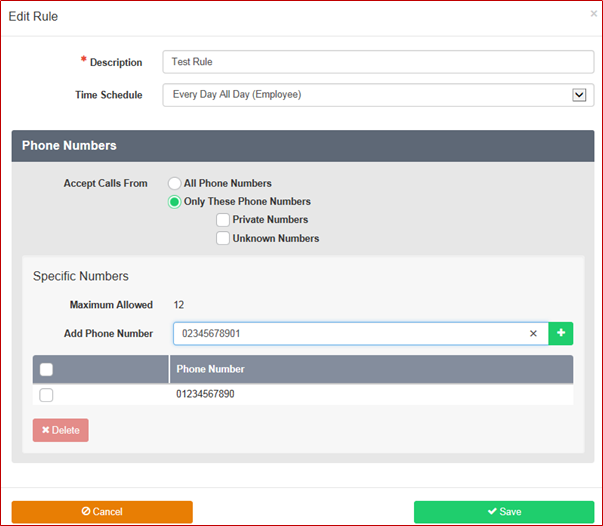
- To add a phone number type the number into the box and click the ‘+’ button

- To delete a number select the right hand tick box and click delete
- To delete all numbers select the right hand tick box in the header bar and click delete.
- When you have completed the configuration Click ‘Save’
 Subscribe to Article
 Email Article to Friend
 Export to PDF